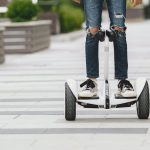
So, you’re wondering how to connect Hoverboard Bluetooth? Ah, the perks of technology. Hoverboards aren’t just about zipping around the place; they’re about doing it with style. And what could be more stylish than streaming your favorite tunes through your hoverboard’s built-in speaker?
With a few simple steps, you can connect your mobile phone to your hoverboard via Bluetooth, turning your ride into a musical journey. Knowing how to pair your device through Bluetooth to your hoverboard isn’t just about the music, though.
It’s about unlocking a whole new level of fun and functionality. So, buckle up because, in this guide, we’ll tackle all there is to know about the wireless bliss between your smartphone and hoverboard. By the end, you won’t just be riding; you’ll be grooving to your favorite beats wirelessly.
Key Takeaways
The connection between your mobile phone and hoverboard is made wirelessly through Bluetooth pairing.
Knowing how to pair your device is vital to unlocking additional hoverboard features.
Once your device is connected, you can play music wirelessly through your hoverboard’s speaker.
The process of connection merely requires a few simple steps.
Unraveling the Concept of Bluetooth Hoverboards
Bluetooth hoverboards are the next level up from the usual self-balancing scooters. Sure, regular hoverboards can have you feeling like Marty McFly from “Back to the Future,” but combine it with Bluetooth, and you enjoy an amplified riding experience.
It’s more than just balancing and spinning around; it’s about enjoying your favorite songs while cruising around like a pro. The concept seems like something out of a sci-fi movie – but it’s pretty straightforward.
Your hoverboard has Bluetooth, and when it syncs with your mobile device, music can be streamed from your playlist through the hoverboard’s built-in speaker. Talk about convenience!
Understanding the Function of Bluetooth on a Hoverboard
So, what exactly does Bluetooth do for your hoverboard? It’s not just about blasting music wirelessly from your device while you ride around the neighborhood.
It can also monitor the hoverboard’s status and control its settings from your phone. Think of it as the bridge between your hoverboard and mobile phone, allowing them to work together like two peas in a pod.
Recognizing if Your Hoverboard is Bluetooth-enabled
The first thing you must realize is that not all hoverboards are created equal. Not every self-balancing scooter on the market has the feature to connect your wireless device to it. Detecting if your hoverboard is Bluetooth-enabled can be as simple as checking LED lighting.
If your hoverboard has a Bluetooth symbol lit up, then you’re good to go. If you’re eyeing one for purchase, a good rule of thumb is to look out for product descriptions or packaging info that mentions Bluetooth functionality.
When all else fails, ask the seller directly or check the manual if you’ve already bought the gadget. That’s about it, folks. Nothing complicated, really.
Expert Steps on How to Connect Your Hoverboard to Bluetooth
Bluetooth hoverboards are the rage these days, enabling you to jam to your favorite tunes while cruising the streets. Before we jump into the details, first things first, your hoverboard must have built-in Bluetooth.
Just like your mobile phone, not all hoverboards come with this feature. But once you have your Bluetooth-enabled hoverboard and mobile device at the ready, let’s start the process.
Preparing Your Hoverboard and Smartphone for Connection
The first thing we’re going to do is prep your hoverboard and smartphone for the beautiful dance they are about to perform together. Alright, grab your hoverboard and turn it on. Most times, a sound plays if it’s Bluetooth enabled, so keep your ears sharp.
For your smartphone, whether it’s Apple or Android, the steps are similar. Hop into your settings, find that Bluetooth option, and give it a tap to bring up the list of nearby Bluetooth devices. Now, it might be tempting to try and connect to all those devices, but let’s stay focused here.
Methodology for Connecting Smartphone with Bluetooth Hoverboard
Now comes the part where we join these two devices together in wireless harmony. It’s simpler than you think. Most hoverboards will automatically turn on Bluetooth (nifty, right?). But if it doesn’t find anything to connect to within about two minutes, it will turn itself off to save power.
So, ensure you’re ready to go on your mobile device, with your hoverboard appearing in the list of nearby Bluetooth devices. If it doesn’t pop up, don’t sweat; just turn your hoverboard off, and back on.
If you’ve struggled before, you might have to disconnect the hoverboard from your device’s Bluetooth list and reconnect. Remember: patience is key here.
Sometimes, tech has a mind of its own. Trust me, I’ve been there. If you’re struggling with connecting your hoverboard to Bluetooth, there could be a few causes. Let’s see if we can set you straight.
Insights on “Hoverboard Not Connecting to Bluetooth?” Issue
Okay, so your hoverboard’s not connecting to Bluetooth; we’ve all been there. Don’t throw it out the window just yet. Always ensure that the Bluetooth on the hoverboard and your device is turned on.
And remember, the hoverboard will automatically turn on Bluetooth, but it’ll turn off after two minutes if no connection takes place. If you missed your opportunity to connect the device after those two minutes, you have to turn off the hoverboard and then turn it back on.
If no connection happens, let’s try this: disconnect the hoverboard from the Bluetooth device list on your device and then reconnect it. And voila! Your hoverboard is back to letting you ride along to your favorite songs.
Mainstream Reasons for Connection Failure and Their Solutions
Well, everybody knows that hoverboards are a blast, especially ones with Bluetooth. But what happens when you find yourself twiddling your thumbs, just staring at your wireless connection, waiting for it to pair up with your favorite self-balancing scooter?
I’ll tell you what – you aren’t grooving to your favorite songs while cruising around. Let’s look into some of the common snags people find when they’re wrestling with their hoverboard’s Bluetooth not behaving right.
Low Battery Problems
Wireless connections can be real battery sappers. If your power level is scooting around the lower side, you might have a tough time keeping your phone or tablet connected to the hoverboard.
Whether your hoverboard has Bluetooth or not, it needs a decent amount of juice to function correctly. So, ensure your battery’s charged up well and plenty before you kick off your journey into the wireless world.
Issues due to Out of Range
Bluetooth isn’t omnipresent, you know. It’s got a range, and if you’re stepping over that boundary, you’re going to have the classic “out-of-range” snag. It might cause your Bluetooth pairing to act like a turtle on a zipline.
So, ensure you’re within Bluetooth’s range, helping it hook up flawlessly and stream your favorite songs. And, if push comes to shove, you may need to reconnect your device to the hoverboard.
Complications of Having Too Many Connected Devices
Imagine being at Thanksgiving dinner, where everybody wants a piece of the turkey, and there’s only so much to go around. Well, this is similar to when you’ve got more devices trying to connect to your device than it can handle all at once.
It’s like your Bluetooth at Thanksgiving dinner with gadgets floating around it. It might end up with a “connection is unsuccessful” notification. So, do yourself a favor and minimize the number of connected devices to your Bluetooth at once for a smooth-as-butter connection.
The Process of Resetting Hoverboard Bluetooth for a Fresh Start
Resetting your hoverboard’s Bluetooth is like treating it to a well-deserved vacation. It allows the Bluetooth to unwind, start fresh, and do its thing with more vigor the next time it’s brought into play.
Whether it’s for playing music or turning LED lighting on and off, Bluetooth can handle its tasks better after a reset. It’s all very hush-hush and could help you sidestep those annoying connection issues.
So, how do you reset your hoverboard Bluetooth? Well, it’s as easy as pie. And don’t worry, you won’t need to play around with any techno-jargon or understand any lines of code.
Trust me, I’ve been there, and it isn’t as intimidating as it sounds. This quick and clean reset guide is worth a shot if you’re facing any connection issues.
Step-by-step Guide on How to Reset Bluetooth on a Hoverboard
Alright, listen up, folks, cover your ears; we’re about to dive deep into the tech world. It’s simpler than it sounds. If your hoverboard’s Bluetooth functionality is giving you a hard time or you’re struggling with an imbalance between two wheels or even speaker problems, don’t despair.
You might just need to reset the Bluetooth on your hoverboard. Here’s how you do it: first, turn the power off. Then, make sure to keep both sides of the pedal parallel to the horizontal plane – think flat like a pancake smoking on a griddle.
Hoverboard Brands and their Bluetooth Features
So now you have the Bluetooth on your hoverboard in check, let’s take a ride down the lane of the biggest brands and their Bluetooth features. Bluetooth hoverboards are a blast, letting you bump your favorite songs while cruising the town.
Not all brands are created equal in this wireless connection world. Some have more robust Bluetooth features than others. But don’t fret; we’re here to guide you so you can make a wise decision. So buckle up because it’s going to be a wild, informative ride!
You might’ve heard the name Gyroor thrown around when we’re talking about self-balancing scooters, or as we common folk call them, hoverboards. These guys are top-notch.
The question is, does Gyroor bring Bluetooth to their party? Well, spoiling the suspense, yes! Gyroor hoverboards are most certainly Bluetooth-compatible. You can groove to your favorite tunes while showing off your moves.
Boy, we hear you. Try as you might, it’s just not happening. It could be due to a couple of things like a low battery or maybe you’re just out of range. Remember, our beloved wireless connection can be a fickle friend. Ensure your self-balancing scooter and your phone are fully charged and within range of each other.
Simple. You’d mostly see LED lighting indicating the Bluetooth status or the device name will appear on your smartphone when you scan for available devices.
Well, if your hoverboard and phone are fully charged and within range, there could be too many devices connected to your Bluetooth at once. Make sure to disconnect from other devices and try again.
Nope. Your self-balancing scooter doesn’t need the internet to sail smoothly with Bluetooth. It works off of a radio wave, like those old-school walkie-talkies, but way cooler.
Comprehensive Conclusion: Hoverboard Bluetooth Connectivity and Beyond
This journey into the wireless world of Bluetooth hoverboards has shown us that Bluetooth is not just about music; it’s about bringing your ride to life. From self-balancing scooters loaded with LED lighting to the thrill of off-road adventures with electric scooters, the Bluetooth function truly enhances the hoverboard experience.
With the tap of a smartphone device, your favorite songs blast through the hoverboard’s built-in speakers, and suddenly, you’re not just riding but gliding to the beat.
Remember, every hoverboard model is different, and functions like LED lights, switch ride mode, and even the speakers in the hoverboard can all impact your connection. So, ensure you are familiar with your hoverboard’s features. Knowledge is power, after all. How to connect Hoverboard Bluetooth is now an adventure you’re ready to embark upon.
Hi! My name is Johnathan, and I am the creator of ScooterAdvice360.com. Having been riding motor scooters and bikes for over 20 years, I have picked up a few things! I ran my own scooter store in Florida, selling all manner of motor scooters, mobility scooters, hoverboards, e-scooters and accessories, from Forzas to Vipers, Hellcats to Vespas.
Here, at ScooterAdvice360.com, I want to ensure everyone has access to the information that they need to enjoy their bikes and scooters for longer.